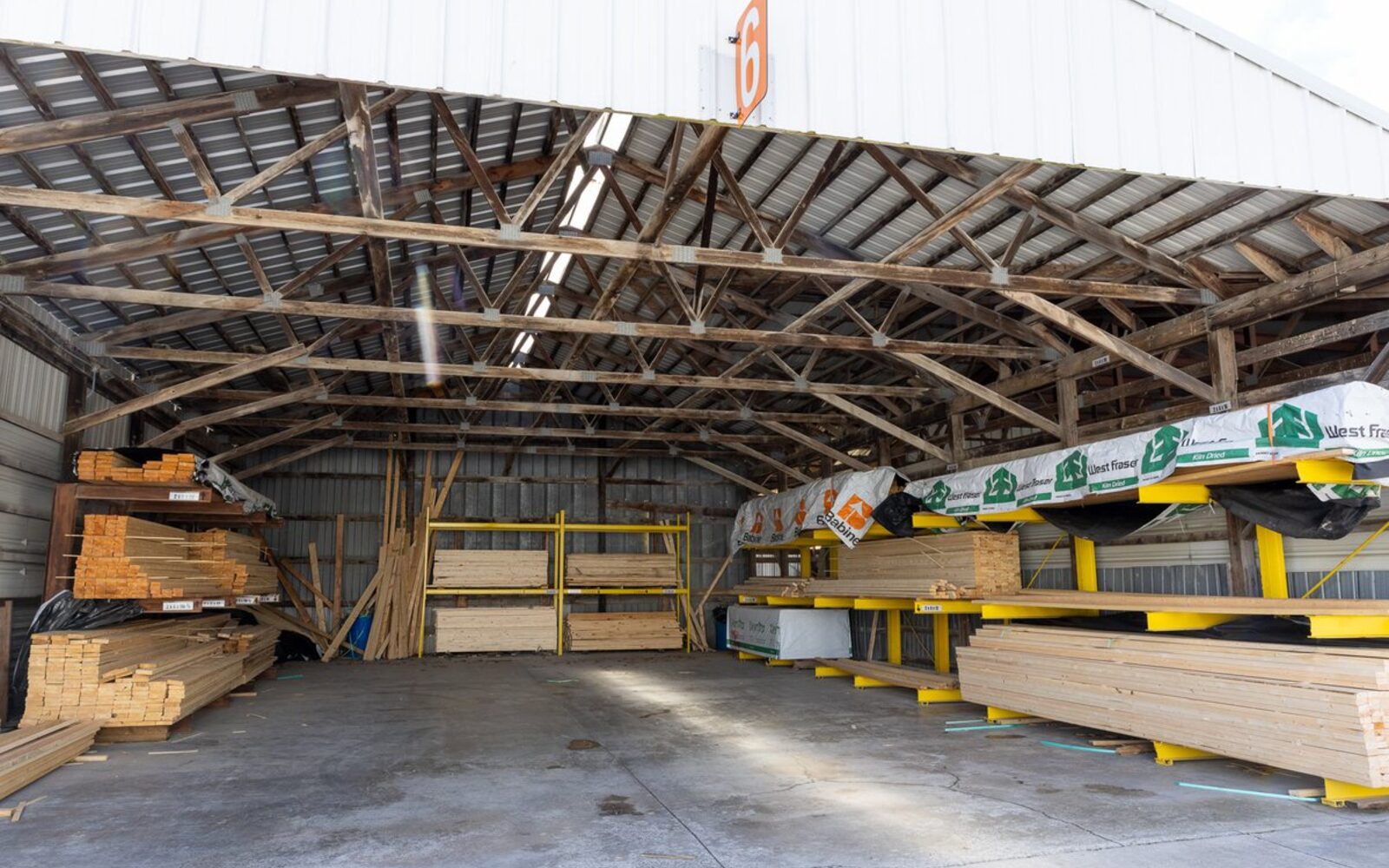
The hardest part of running a promotion has never been the sign out front or the price on the tag, it is deciding what belongs on the sign in the first place. Gut instinct nominates whatever you have been walking around for six weeks, which is a fine start and a lousy finish, because the pallet you keep tripping over might be the one you can least afford to discount while the item quietly killing your margin sits two aisles over with nobody's name on it.
So we asked Dooey to write a memo meant for a store owner to follow on a Tuesday morning with a cup of coffee. Here it is, along with what happened when we ran it (on a demo account), where the product that looked most like dead stock turned out to need two different offers.
Step 1: ask Dooey to find the candidate
Dooey reads your sales, your inventory, and your customer history directly, which means the right move is to ask a question rather than to build a report. These are the prompts Dooey suggests starting with:
"Which products haven't sold in the last 60 days?"
"What's overstocked right now compared to how fast it's selling?"
"What are my top sellers this month that I could bundle with a slower mover?"
"Show me products with high margin but low sales volume."
"Which vendor's line is underperforming compared to last quarter?"
The answers come back with revenue, quantity sold, days of inventory on hand, rather than a hunch dressed up in a chart. Pick a product or a category from the list, or keep narrowing with a follow-up like "of those, which has the highest margin?"
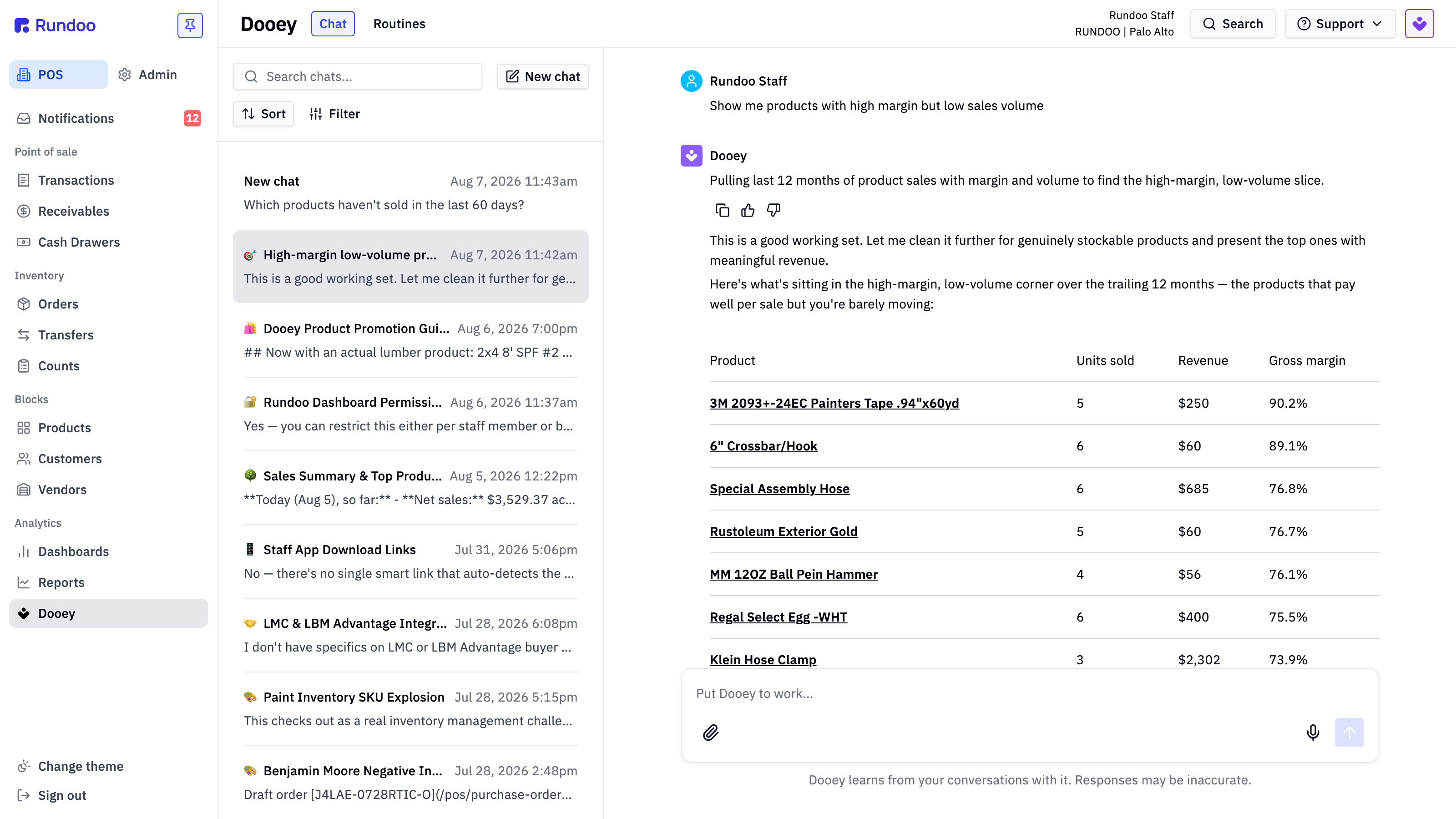
Notice what came back with the table in that answer: Dooey explains how it built the list, which was twelve months of sold-product data, minus the fees, gift cards, labor, and rentals that are not really inventory, filtered to items selling ten units or fewer at a margin of 55 percent or better. It also flags the rows it threw out, in this case a batch of products showing an inaccurate 100 percent margin because no cost was ever recorded against them. Showing its work is what makes the answer usable, since you can argue with the filter rather than having to trust the list.
The fourth prompt tends to earn its keep the fastest in any store, because high margin and low volume is where the sundries, the fasteners, the adhesives, and the specialty items hide, and those are the products a regular customer adds to a big order without blinking at the price. The fifth one catches a brand losing ground to the one sitting next to it on the shelf while your on-hand quietly climbs. Add the seasonal version too, since an independent supply store's calendar is not a straight line:
"Which products sold well in August last year that I have not moved yet this August?"
Step 2: ask Dooey to shape the offer
Once you have a candidate, AI can continue to do the heavy lifting:
"Draft a promotion idea for the slow-moving [product or category] you just found."
"What discount or bundle would move this inventory in 30 days without killing margin?"
"Write a short customer email or text announcing this promotion."
Dooey will draft the pricing logic, the timing, and the outreach copy. Treat all three as a first draft you edit and approve, the same way you would treat a new hire.
Two instructions are worth adding here. The first is attachment, because a promotion that pulls a customer through the door is worth more than the margin you gave up on the promoted item, and the trip usually sells the fasteners, the tape, the brackets, and the sundries that ride along with it:
"What do customers usually buy in the same transaction as this product? Build the promotion around the bundle rather than the single item."
The second is audience. You already know who bought this category last year, and so does Dooey:
"Which accounts bought this category last spring and have not bought it this spring?"
That list is the promotion. The discount is only the excuse to make the call, which is how Ron at AllPro Paint won back half of a twenty-account list of drifted customers within three months of Dooey handing him the names.
Step 3: build the promotion in the POS
Dooey does not push this button, you do. The promotion itself gets set up under POS → Products → Promotions → Add promotion, where you:
- Pick the scope, either specific products or rules by vendor, department, or tag
- Set the discounted pricing, by dollar or by percentage
- Set the schedule with a start and end date
- Choose which locations it applies to
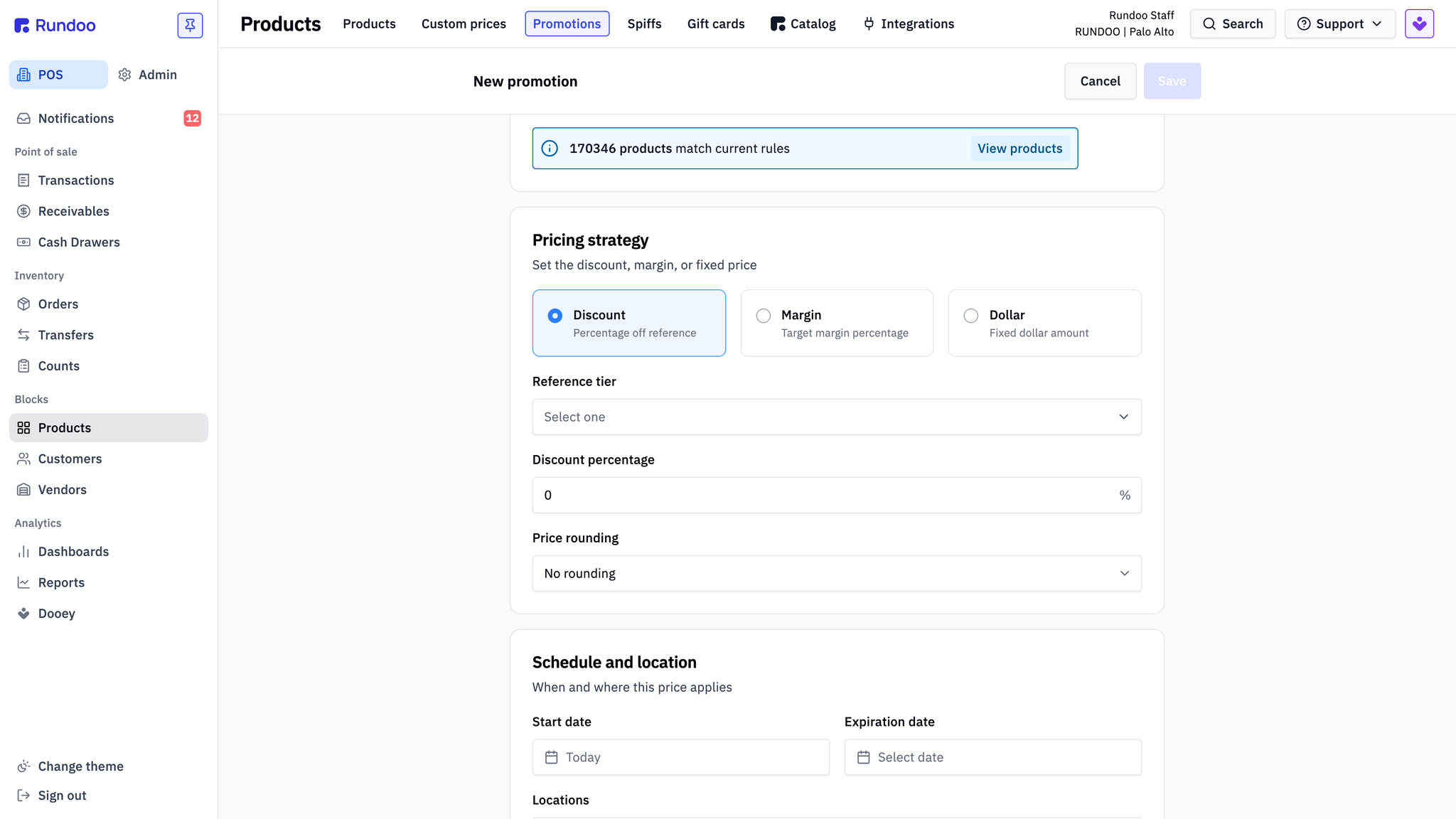
Scoping by vendor or by tag is the shortcut most stores want, because a promotion is rarely one SKU. Tag the product family once and the promotion follows every size and every variant in it, which beats keying twelve line items and discovering on Saturday that the big ones never got the memo. Learn more about promotions, cost changes, and margin rules on the page covering managing pricing and purchasing for your store.
What happened when we ran the memo
Every number in this section and the next comes from the demo store we use for training and product walkthroughs, a fictional multi-location supply business stocked with sample data rather than any real store's books. The figures were pulled in the first week of August 2026, and because that demo store keeps generating simulated activity, the inventory positions move from one day to the next, the same way yours do.
We asked for one product worth putting on promotion this month, overstocked relative to how fast it sells, with enough margin to discount without hurting the bottom line, and asked for the numbers, an offer that would move it in thirty days, and the customers to target. The pick that came back was a 16 ounce ball peen hammer.
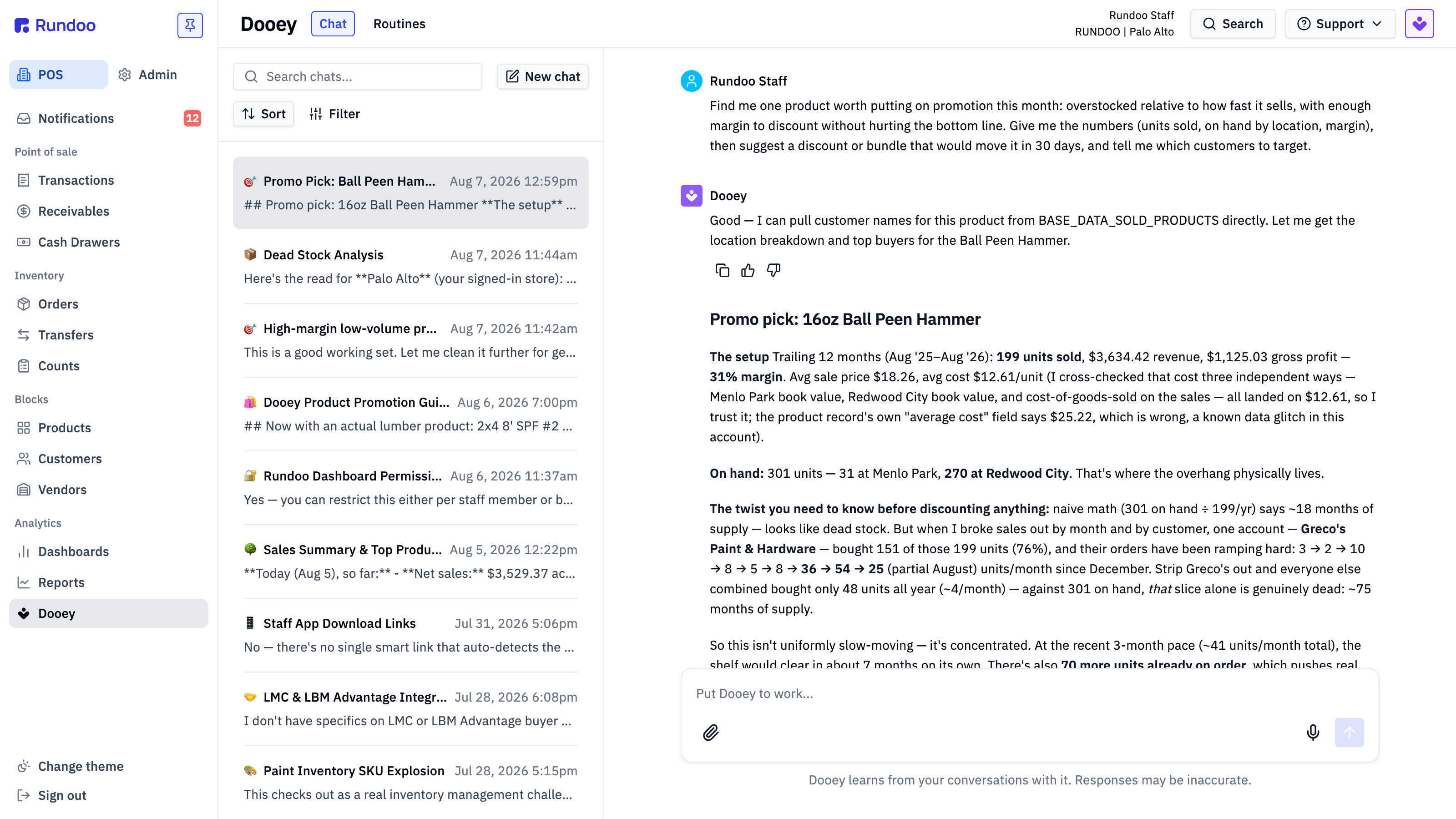
The setup was 199 units sold over twelve months at 31 percent margin, an average price of $18.26 against a cost of $12.61, and 301 units sitting on hand, split 31 at one location and 270 at the other, which is where the overhang physically lives. Worth noting for its own sake: Dooey cross-checked that unit cost three separate ways, against each location's book value and against cost of goods sold on the actual sales, because the product record's own average-cost field said $25.22 and was wrong.
Then came the part that changes the whole program. Naive arithmetic says 301 units on hand against 199 a year is roughly eighteen months of supply, which reads as dead stock and invites a blanket discount. When Dooey broke the sales out by customer, one account had bought 151 of those 199 units, and its orders had been ramping from three a month in December to fifty-four in July. Remove that one buyer and everyone else combined bought 48 units all year, about four a month, which against the same 301 on hand is closer to seventy-five months of supply. The hammer is not slow, it is concentrated, and those two conditions call for opposite offers.
So the recommendation came back as two tracks rather than one sale:
- A case-price break for the account already buying, ten percent off orders of 24 or more, to lock in and grow a standing order that is growing anyway. Volume through your biggest repeat buyer clears more inventory than any shelf tag.
- A shelf discount at the location holding the overhang, fifteen percent off, which takes $18.26 to $15.52 and still leaves 18.8 percent margin and $2.91 of profit a unit. That is a promotion, not a loss leader.
- A named audience for that second track, pulled from the store's own history: a repeat buyer tagged high-growth, and a contractor account whose overall spend had fallen 45 percent year over year, which makes the discount a cheap reason to reopen the relationship.
- A realistic target, 70 to 100 incremental units in thirty days rather than the full 301, plus a flag that another 70 units were already on order and that purchase order might want trimming before anybody advertises anything.
That is a program you can build in the promotion screen above in about two minutes: scope it to the one product, set fifteen percent off, set the dates, and limit it to the location with the pile. The account-level case price is a conversation rather than a shelf tag, which is the sort of thing an owner does well and a discount rule does badly.
Sometimes the answer is not a promotion
Run the same memo on a different product and it will happily tell you not to run the sale, which is worth as much as the sale itself.
We tried it on the 2x4 8' SPF stud, the most ordinary SKU a yard carries. Volume climbed all year to a peak of 663 units in May, then June fell off a cliff to 46, a drop of more than ninety percent in a single month, and July bounced back over 200.
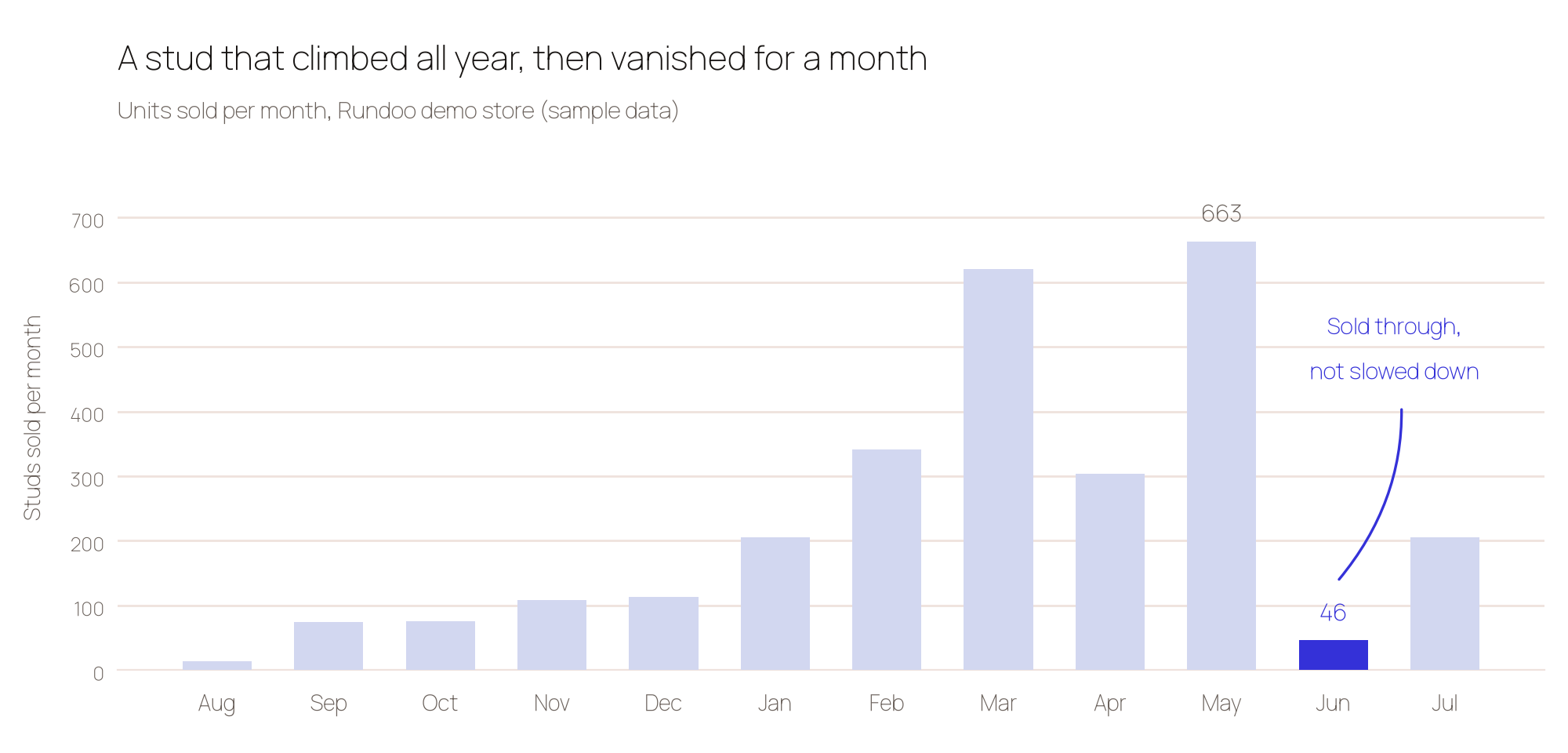
A June like that reads as a demand problem until you check the shelf. One of the four yards was sitting at negative on hand, backordered and oversold, and a second had run itself down to nothing while the others still had stock, so June was not a slowdown, it was a sellout. Margin on commodity dimensional lumber is thin enough that there was no room to cut price anyway, and discounting an item you cannot keep in stock is a way to spend money making your own customers angrier. The right program there was a standing order for the crews who buy studs every week, plus a note telling customers which yards had stock, which sells a service rather than a discount.
Any store lands in this fork eventually. A paint store finds that the sheen everyone wants is the one that keeps running out, and a farm and feed store finds the same about a feed that moves on a weather pattern. The memo is useful precisely because it tells you which of the two you are looking at before you commit to a price.
Check it before you send it
Two checks matter more than the rest, and both came out of that same lumber run.
The first is whether you can supply what you are about to advertise. Confirm the purchase orders are already moving for the locations that are short, because a newsletter that drives more demand into an empty yard is an own goal with postage on it.
The second is to distrust any number that disagrees with itself. On the hammer, the product record's own average-cost field read $25.22 while the true cost was $12.61, a gap that would have turned a healthy fifteen percent discount into a promotion you cannot afford. Dooey caught it because it checked the cost three ways, against each location's book value and against cost of goods sold on the actual sales, rather than trusting the summary field. The same thing happens with quantities, where a rolled-up stock figure will say 640 on hand while the locations add up to 113. Every answer comes with the underlying report, so click through when a figure looks off, and be most suspicious of the numbers that would most change your decision. A live store throws the same curveballs through a bad receipt, a stray import, or a unit-of-measure mix-up.
Good habits from the memo
Dooey closed its own memo with three rules, and they are the right ones:
- Sanity-check the numbers against the report link. Dooey shows you the underlying data rather than only the summary, so click through before you commit to a price.
- Treat drafts as drafts. Copy, pricing suggestions, and bundle ideas are starting points you edit and approve, not finished assets.
- Confirm anything that writes. If you ask Dooey to build a sale, an order, or a transfer as part of the program, it will always come back as a draft that you open and confirm yourself.
That last one is the whole trust model in one line, and it is why owners who start on the Analyze rung and work up get comfortable letting Dooey do the legwork. Nothing changes in your store without a human saying yes.
A promotion nobody measured is only a discount
Set the baseline before the program starts rather than after, and ask for it in the same plain English you used to find the product:
"What did we sell of this category in the four weeks before the promotion, in units and in margin dollars?"
Ask the same question weekly while it runs, and watch margin dollars rather than units, because moving a pile at a price that loses money is a yard-clearing exercise rather than a marketing program. Ask the attachment question too, since a promotion that lifted the sundries alongside it is doing exactly what you built it to do.
When a version of this works, the memo becomes a routine, and a routine is a candidate for automation. Owners who have run the loop a few times start scheduling it, so on the first Monday of every month Dooey nominates the overstocked, the underperforming, and the high-margin candidates for the next program and drops the shortlist in their inbox before the doors open. The nomination is automated, the decision stays yours, and the store stops guessing.
The reason any of this works is that the sales history, the on-hand by location, the customer accounts, and the promotion all live in the same system, which is what lets one question turn into a program instead of a scavenger hunt across four screens. See what that looks like in a store like yours, or book a demo and bring a product you have been meaning to move.